Pushing Data From Meshtastic to Home Assistant
I mentioned previously that I was playing around with Meshtastic stuff, but here’s more detail on the software side of those projects. I’ll show the hardware side and what Meshtastic does in a later post, but here I talk about three ways I’m getting information from my Meshtastic node into Home Assistant:
- Using the MQTT pub/sub protocol
- Polling a telemetry REST API on the node
- Using the Meshtastic python API to poll the node
All of these offer a different subset of the same info and none of them offer everything. Years of operating long lived systems has me really reluctant to modify more than I have to to get what I want – every customization is a maintenance task when you upgrade. For all of these I’ve avoided integrations that aren’t built-in and Add-Ons/Apps that aren’t bog standard.
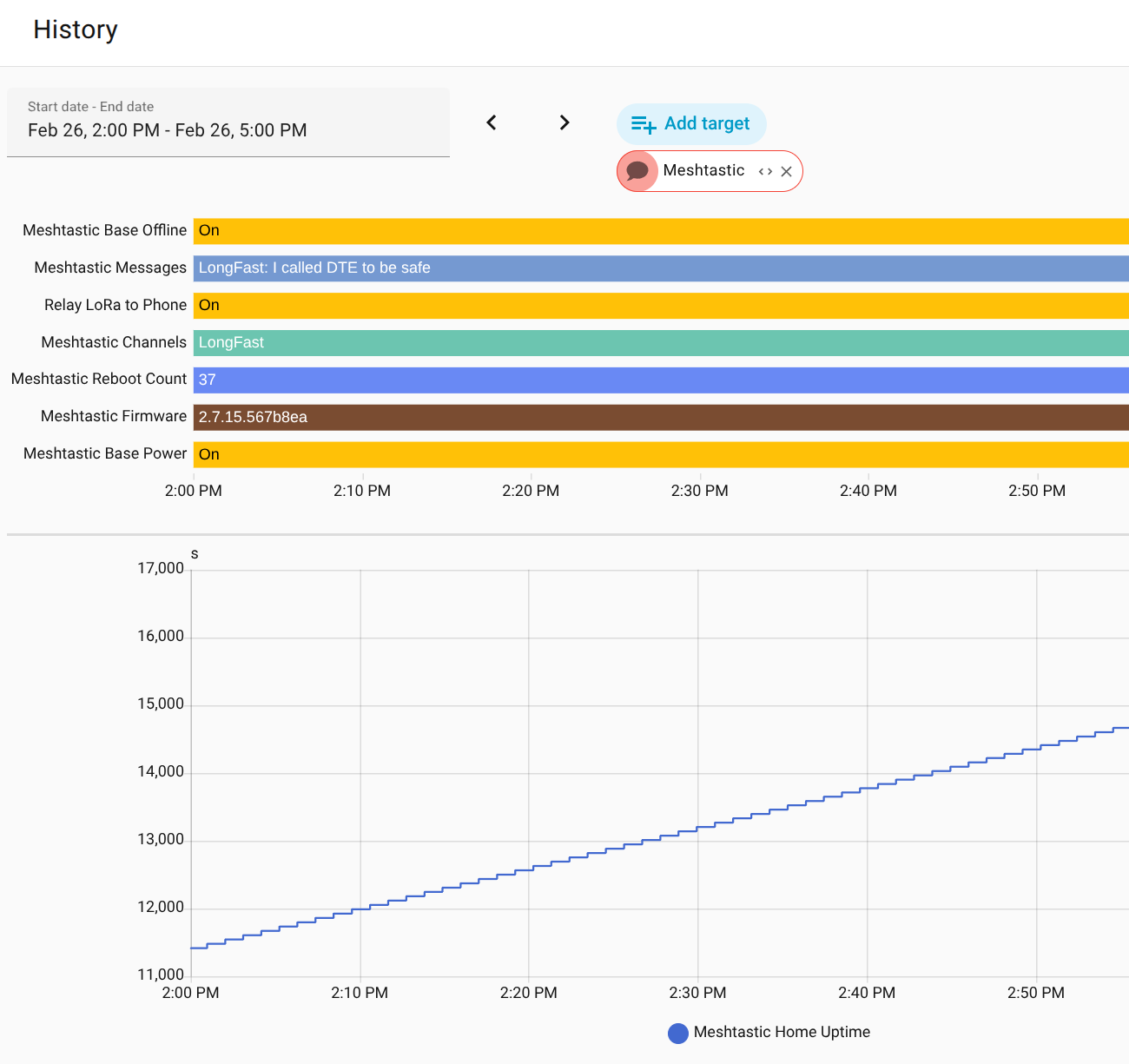
Below is an example of each mechanism for getting Meshtastic data and how they combine to give a pretty full view of the node’s status in Home Assistant.
1. Using the MQTT pub/sub protocol#
This is the way Meshtastic recommends you get info into home assistant, and it has many advantages:
- it’s asynchronous with all the durability that implies
- it updates as things change, which how you want to learn about new messages
- Home Assistant has great MQTT support so devices and entities are easy to set up
This is really well documented within
Meshtastic
so I won’t repeat that here, but the only data I’m getting through this route
currently are the real-time messages on all channels and the Meshtastic neighbor
count, which is the quantity of one-hop nodes you’re actually talking to over
LoRa – and only if you have the neigbor_info module turned on. Unfortunately
that last value maxes at 10, so it’s less useful for connection quality
monitoring than I hoped. That config lives in a break-out included by my
configuration.yaml
which I called
meshtastic_mqtt.yaml.
It defines each of the two entities described above:
|
|
That first sensor uses an input_select helper to map channel numbers to
channel names, but otherwise just takes the text from the last message and sets
it as a state. I have an automation that notifies me of
changes, which means every new message.
The second sensor just stores that neighbor_count value in a sensor state.
I was hoping to use that to detect difficulty with the LoRa radio, but it’s
always at the artificial max value of 10 because the node density around here is
so high.
2. Polling a telemetry REST API on the node#
Meshtastic nodes on wifi networks have a no-authentication required REST API
at /json/report that emits a json document with some node information. It’s
not everything, but it’s better than nothing. Home Assistant is really good at
polling REST APIs and ingesting the data, and the built-in
RESTful integration is how
it’s done.
Getting the data from the node required a simple stanza in
configuration.yaml
that looks like:
|
|
There are some other values available, but nothing too special. The most interesting thing I’ve learned from this is that my node’s unscheduled reboots that happen every 26 hours or so correspond with low Heap Free, and got worse when I started polling this API!
I get the sense that the Meshtastic folks consider this json API legacy and I wouldn’t be surprised if it goes away eventually. It only works on wifi (not serial and not bluetooth) and requests to add more data to it have been idle on Github for years.
When the uptime value hasn’t been updated for 30 minutes I assume the node is dead and use the Zigbee plug to power it off and back on using this automation
3. Using the Meshtastic python API to poll the node#
This is so obviously the right choice that someone has already done it as a home assistant integration. Meshtastic offers a great command line interface, which is just a thin wrapper around the Meshtastic python API, which works for serial, bluetooth, and wifi connected nodes. The API allows you to get or set any value. It’s how the Android, iOS, and web client apps talk to nodes to make the robust interfaces they offer.
I really try to avoid non-standard integrations, and already have MQTT in place for message relay, so instead I pulled together a tiny script to shuttle this data into home assistant. It uses a little python to read from the node’s protobuf API and POST a message to a home assistant webhook, which can update multiple sensors.
On the Home Assistant side the configuration looks like:
|
|
The only value that sensor is pulling for me is the firmware version, but almost everything is available over the API, so if there is data you want from your node I recommend using a similar approach. I could have skipped the other two connection types if I’d built this first. I plan to get an accurate count of the currently/recently connected 1-hop nodes and then track their SNR over time.
Thanks to all the Meshtastic and Home Assistant folks who have made these two platforms so easy to work with and to connect. No AI was used in the creation of this system or write-up.